Musical Toy Piano and Songs
- 3.6
- Rating
- 1.00M
- Installs
- Free
- Price
 Analysis by App-foxy
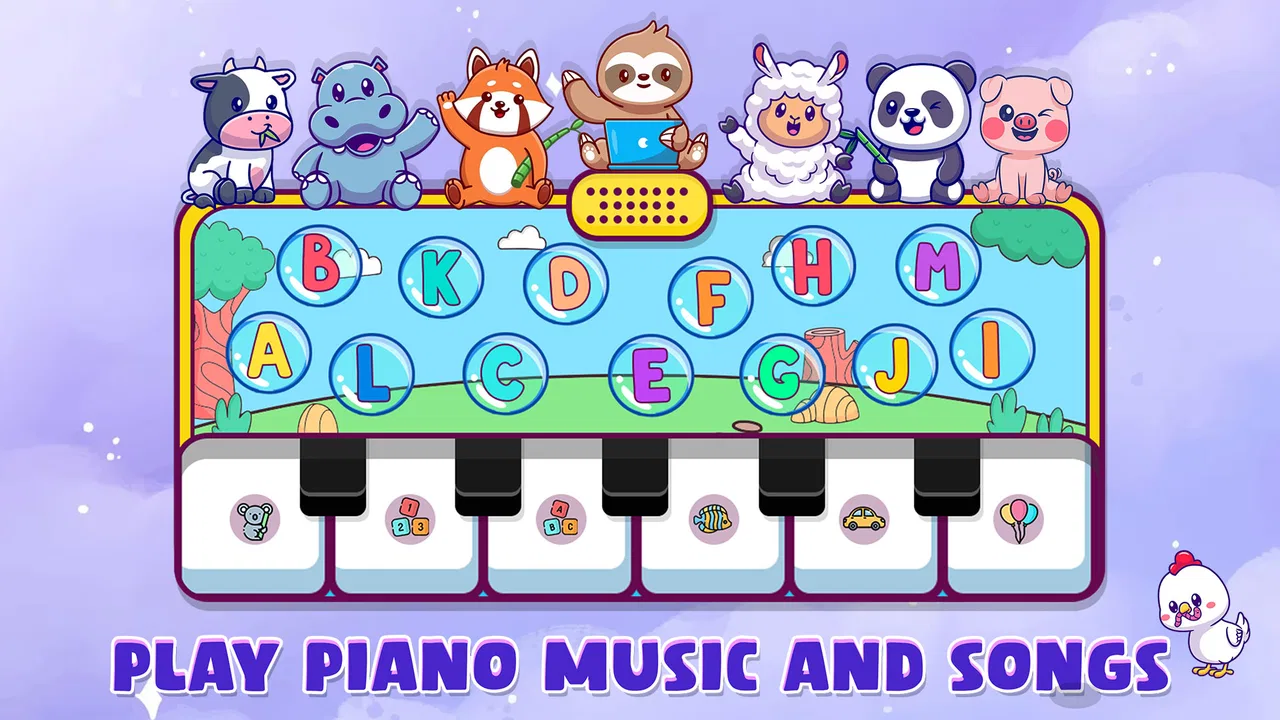
Musical Toy Piano and Songs is the kind of game I would put on a child’s tablet when the goal is simple musical exploration rather than a full lesson plan. It brings together a piano, drums, xylophone, and toy phone in one colorful package, so a child can tap, experiment with sounds, and begin noticing rhythm and pitch without needing to understand formal music theory. NutGenix Games presents it as a free music game for Android, and after spending time with it, I found its biggest strength to be its immediate, low-pressure approach.
I would not describe it as a replacement for piano tuition or a serious instrument-training app. Its appeal is different: it turns a touchscreen into a small collection of playful instruments. That makes it useful for short sessions, early musical curiosity, and quiet experimentation. The best results come when an adult treats it as a starting point for conversation—asking a child to copy a rhythm, find a high note, or make up a tiny tune—rather than expecting the game to teach structured songs on its own.
How the current version feels in everyday use
I find the current release most useful when I treat it as a short, hands-on activity rather than something a child needs to master all at once. In this section, I’ll focus on how a familiar routine can make its instruments easier to explore, then turn to the practical checks that help a session feel comfortable.
You May Also Like

 Blood Strike: 2.5 Anniversary
Blood Strike’s Loadouts Turn Every Drop Into a Tactical Gamble
A close look at Blood Strike’s custom loadouts: how fast access to signature weapons reshapes its battle royale rhythm, rewards preparation, and narrows the gap between fights.

 Pandora - Music & Podcasts
Pandora’s Music Is Easy to Start, but Harder to Recover
Pandora’s strength is its low-effort path from a seed to a station. Its weak spot is how much confidence it asks you to place in connection, setup, and quiet recovery.

 8 Ball Pool
 Is Built on Rivalries, Rematches, and Routine
A close look at the rivalries, rematches, shared routines, and unanswered safety questions that turn a quick pool match into a persistent mobile community.

 Samsung Music
’s Quiet Strength Is Playing What You Already Own
Its reach comes less from spectacle than from dependable access to a personal library. That simplicity is both the app’s strongest retention engine and its ceiling.

 AccuWeather: Weather Radar
AccuWeather Review: A Quick, Clear Forecast for Everyday Decisions
For everyday plans, the best forecast is the one you can understand quickly. AccuWeather makes rain timing, radar, and local conditions easy to act on, with a few trade-offs.

 Hill Climb Racing
Why Hill Climb Racing Still Turns Crashes Into One More Run
A tiny car, a bumpy hill and one more upgrade: Hill Climb Racing keeps resurfacing because its simple chaos makes every near-miss feel personal.
More From Our News Desk



A compact musical playground rather than a formal course
The first thing I noticed is how quickly the game gets to its main idea. There is no need to prepare an account, understand a complicated progression system, or spend time learning a dense interface. The instruments are the attraction, and the experience is built around tapping them. That simplicity matters for younger players, especially those who may lose interest if an app begins with instructions, menus, or achievement screens.
The piano is the natural starting point, but the other instruments give the app more variety than a basic keyboard toy. The drums encourage rhythm and repeated patterns, while the xylophone makes individual notes feel visually and sonically distinct. The toy phone adds a pretend-play element that may appeal to children who are not yet interested in making melodies. I see these choices as complementary: one child may focus on musical sounds, while another may approach the same app as an interactive toy.
Because everything is touch-based, the game works best for spontaneous play. A child waiting at home, taking a short break, or exploring a parent’s phone can open it and start making sounds almost immediately. I also found that the variety helps prevent the experience from feeling like a single repetitive piano screen. Switching instruments changes the type of attention required, from finding notes to keeping a beat or simply enjoying sound effects.
What the age rating means in practical terms
The game is rated for Everyone, which fits its accessible concept. I would still recommend that parents try it alongside a younger child at first, not because the basic idea is difficult, but because shared play reveals how the child responds to the sounds and controls. Some children will naturally experiment with patterns; others may tap randomly and move on quickly. A few minutes of guided play can turn that random tapping into a small musical activity.
For preschool use, I would keep the first session focused on one instrument. Asking a child to find a note that sounds higher, then a note that sounds lower, is more useful than opening every option at once. With a slightly older child, I would move from the piano to the drums and ask them to repeat a simple rhythm. This makes the app more than a noise-making toy without pretending that it contains a complete curriculum.
The game is free, which removes an obvious barrier for families who want to test the idea before buying a dedicated musical app or toy. That also makes it suitable for occasional use, although the trade-off is that a free game may not offer the depth, polish, or carefully sequenced teaching found in paid educational products. I would judge it as a low-commitment introduction, not as a long-term music program.
Small-screen play and the importance of supervision
On a phone, the experience is more personal but also more cramped. The piano and xylophone benefit from a larger screen because several notes are easier to see and touch accurately. A tablet is therefore the better choice when a child is meant to explore for longer, while a phone is perfectly adequate for a quick musical break. This is a practical distinction that is easy to overlook when choosing a music game.
I also recommend lowering the device volume before handing it to a child. Repeated drum taps can become surprisingly energetic, and the game is designed to invite experimentation. Using headphones may help in some situations, but for very young players I prefer shared listening so an adult can hear what is happening and participate. The app works best when sound remains part of the interaction rather than becoming background noise.
Where the developer’s current release fits
The current version is 16.0, and the game supports Android 8.0 or later. Those details make it relevant to people using older but still serviceable Android devices, although the actual comfort of play will depend on screen size, touch response, and speaker quality. I would check compatibility before installing it on a particularly old family phone, but the minimum operating-system requirement is not unusually demanding.
NutGenix Games has kept the central concept focused: several toy-like musical instruments in one app instead of a large collection of unrelated mini-games. That focus is valuable because children can understand the purpose quickly. At the same time, the version number suggests a product that has gone through multiple iterations, so existing users may reasonably expect continued attention to usability and stability even if the main concept remains unchanged.
What has changed, and what that means for returning players
The confirmed version information tells me that the app has reached a mature numbered release rather than remaining at an early prototype stage. I would be careful not to turn that into a promise of a particular new feature, because a version number alone does not explain every internal change. What it does communicate is that the current download is the release users should evaluate today, not an old snapshot of the project.
For someone who has used an earlier edition, the sensible approach is to update and then spend a few minutes checking the instruments that matter most to them. The piano may be the main reason one child returns, while another may care more about the drums or toy phone. A short hands-on comparison is more useful than assuming that a higher version number automatically changes the entire experience.
New users should also avoid judging the game by the expectations attached to a mature release. Version 16.0 does not turn a toy piano into a structured course. The core value remains immediate interaction. If you want guided theory, graded exercises, notation, or a clear practice path, you will still need a different kind of app. If you want a broad set of playful instruments without paying first, this release remains easy to understand.
Three ways I would get more from the app
My first tip is to use the instruments in sequence instead of treating them as separate toys. I would begin with the piano by making a short pattern, move to the xylophone and try to reproduce the same rise and fall, then use the drums to create a beat underneath it. This simple workflow helps a child notice that melody and rhythm are different jobs. It also gives the session a beginning, middle, and end without requiring a built-in lesson system.
My second tip is to use imitation rather than correction. An adult can tap a small pattern and invite the child to answer with their own version. If the response is different, that is not a failure; it is an opportunity to talk about whether it sounded faster, slower, higher, or lower. This makes the touchscreen responsive to listening, not just tapping, and it works especially well when a child is too young for written instructions.
My third tip is to set a creative limit. I might ask the player to make a “rain” rhythm on the drums, a “happy” sequence on the xylophone, or a pretend phone call using the toy phone before finishing with one piano note. These prompts prevent the session from becoming a stream of unconnected taps. They also reveal whether the child enjoys rhythm, melody, or imaginative play, which can guide the next musical activity away from the screen.
How it compares with ordinary alternatives
Compared with a physical toy piano, the game is easier to carry and offers more than one instrument in the same place. A real toy can feel more tactile and may be better for children who enjoy pressing large keys, but it takes up space and does not provide the same quick switch between piano, drums, and xylophone. The app wins on convenience; the physical toy wins on hands-on presence.
Compared with a professional digital piano app, this game is much less intimidating. It does not ask a beginner to understand a full keyboard layout, sheet music, or practice terminology before making a sound. That is a genuine advantage for first contact with music. The trade-off is that a serious keyboard app will usually be better for learners who want accurate practice, a wider range, or a path toward playing recognizable pieces.
Compared with a streaming video lesson, the game is more interactive but less instructional. A video can demonstrate posture, timing, and a complete song, while this app lets the child control the sound directly. I would choose the game for discovery and the lesson for deliberate skill-building. They can work together, but neither one replaces the other.
Limitations that parents and beginners should understand
The main limitation is depth. The app’s collection of instruments creates variety, but variety is not the same as progression. A child may enjoy the piano repeatedly without developing a clear practice habit, especially if no adult adds a challenge. Players who want lessons, notation, recording workflows, or measurable improvement may find the experience too open-ended.
There is also a risk of novelty wearing off. The first session can be engaging because every instrument invites a different kind of tapping, but long-term interest depends on how the player uses them. I would not install it expecting a child to return independently for weeks as if it were a story-driven game. Its strongest role is as a flexible activity that an adult can refresh with new prompts.
Touchscreen instruments have their own compromises. They cannot provide the physical resistance of keys or the nuanced control of real drum surfaces. A child can explore musical ideas, but the gestures do not automatically prepare them for proper instrumental technique. That distinction matters if the app is being considered as the first step toward lessons. It can spark interest, but it should be followed by real listening and playing experiences.
Who should install it, and who should choose something else
I would recommend it to families looking for a free, approachable music game for a young child, especially when the child enjoys switching between pretend play and sound-making. It is also a reasonable choice for a parent who wants a quick activity that can lead into conversations about beat, pitch, and musical patterns. The Everyone rating and modest Android requirement make it easy to consider for a wide range of household devices.
I would skip it if your main goal is to learn a specific song from start to finish, follow a graded piano method, or track technical progress. In those situations, a dedicated piano-learning app, a structured course, or an actual teacher would be a better fit. I would also look elsewhere if you need a rich music-production tool; a toy-focused interface is not designed for composing, arranging, or editing in depth.
For a realistic everyday example, imagine a child becoming restless during a short wait before dinner. I would hand over a tablet with the piano open and ask for a three-note pattern, then invite the child to copy it on the xylophone. After that, we could add a gentle drum beat and finish with the toy phone as a pretend “concert call.” The activity would last only a few minutes, but it would involve listening, memory, rhythm, and imagination rather than passive screen time.
What I would watch in future releases
With a game like this, I would pay attention to whether future updates make musical exploration easier without making the interface complicated. Helpful improvements would be anything that supports a child’s transition from random tapping to intentional patterns, provided the playful character remains intact. I would also want the instruments to stay clearly separated and easy to reach, because the current appeal depends on immediate access.
I would not judge future changes solely by a larger version number. The meaningful questions are whether returning players can still start quickly, whether new users understand the controls without adult translation, and whether the instruments remain useful beyond the first novelty session. For this particular game, small usability improvements could matter more than adding a long list of extra modes.
My final assessment
Musical Toy Piano and Songs succeeds when I treat it as a digital musical toy with several personalities. The piano and xylophone invite melody, the drums introduce rhythm, and the toy phone broadens the experience into pretend play. It is simple enough for a child to approach immediately, yet flexible enough for an adult to turn short sessions into small listening and copying exercises.
Its free price and broad age rating make trying it easy, and its current 16.0 release is the version I would evaluate today. The game has attracted over one million installs, while its average rating sits at 3.6 from around 844 ratings, so the public response is mixed rather than universally enthusiastic. I read that as a reason to keep expectations realistic: this is a lightweight activity, not a complete music-learning system.
My honest recommendation is to install it when you want accessible musical play, not formal instruction. Give it a larger screen if possible, start with one instrument, and add your own small challenges. Used that way, it can be a pleasant introduction to rhythm and sound. Used as a substitute for lessons or a serious piano tool, it will feel limited. For the right child and the right moment, though, NutGenix Games has made a straightforward app that encourages curiosity without demanding commitment.
FAQs for Musical Toy Piano and Songs
01What is Musical Toy Piano and Songs?
Musical Toy Piano and Songs is a child-friendly music app designed to let young users explore piano sounds, melodies, and simple songs in an interactive way. It generally combines colorful visuals with touch controls, allowing children to tap piano keys, play familiar tunes, and experiment with different notes. The straightforward design makes it suitable for beginners who have little or no musical experience.
02Is Musical Toy Piano and Songs suitable for young children?
Yes, the app is primarily designed for children and beginners. Its large, easy-to-touch piano keys and simple song-based activities make it accessible even for younger users who are still developing coordination. Parents should still supervise children, especially when using a device for extended periods, and review any available settings or advertisements before allowing independent play.
03Does the app require musical knowledge to use?
No musical knowledge is required. Musical Toy Piano and Songs is intended to make playing music feel simple and entertaining, rather than presenting formal lessons with complicated notation or theory. Children can tap keys freely, follow songs, and learn through experimentation. More advanced users may find the experience basic, but it works well as an introduction to rhythm, sounds, and keyboard interaction.
04Can Musical Toy Piano and Songs be used without an internet connection?
Many of the basic piano features and previously included songs may work offline, which is convenient for travel or use in places without reliable connectivity. However, certain content, advertisements, updates, or additional features may require an internet connection, depending on the version installed and the device platform. It is best to test the app offline after installation rather than assuming every feature will be available.
05Is Musical Toy Piano and Songs free to download and safe for children?
The app may be available as a free download, although the exact pricing, advertisements, and optional purchases can vary between Android and iOS versions. Before downloading, parents should check the official store listing for permissions, age guidance, privacy details, and in-app purchase information. Using parental controls and disabling unauthorized purchases is recommended when the app is installed on a child’s device.
Pros
- Simple piano interface suitable for young children.
- Includes songs that encourage musical exploration.
- Bright visuals make the app engaging for kids.
- Playable without advanced musical knowledge.
- Useful for introducing basic notes and rhythms.
Cons
- May feel too basic for older children or experienced players.
- Limited song selection can reduce long-term interest.
- Touch controls may register accidental notes.
- Some features may require an internet connection.
- Ads or in-app purchases could distract from play.

Musical Toy Piano and Songs
Gallery